
info@PresentationPoint.com
  • Facebook
  • Twitter
  • RSS
  • YouTube
  • LinkedIn
  • Facebook
  • Twitter
  • RSS
  • YouTube
  • LinkedIn
  • Reviews
  • Support
  • Resellers
  • Media kit
  • My Account
  • Contact
  • Sites
    • INSYNCR
    • ConnectedCompany.app
    • SignageTube.com
    • SplitFlapTV.com
0 Items
PresentationPoint
  • Solutions
    • Automated Reporting
    • Corporate Communication
    • Event Digital Calendars
    • Live Data Presentations
    • KPI Dashboards
    • Restaurant Digital Signage
    • Waiting Room Signage
    • Custom Data Services
  • Software
    • DataPoint
    • SignageTube
    • iPoint
    • ConnectedCompany
  • Case Studies
    • Index
    • Attractions and Events
    • Digital Signage Solutions
    • Financial
    • Food and Beverage
    • Healthcare
    • Marketing and Advertising
    • Retail
  • Blog
  • Resources
  • About
Select Page
Winning the Election with Personalized Political Campaign Videos

Winning the Election with Personalized Political Campaign Videos

Jan 31, 2024 | Articles, Elections, Government

In the fast-paced world of politics, voter engagement has shifted dramatically. Today’s technology-laden landscape necessitates tools and strategies that facilitate rapid, personalized communication with potential voters. Enter DataPoint, a dynamic software...
Case Study: Election Viewing Party

Case Study: Election Viewing Party

Oct 4, 2022 | Articles, Broadcasting, Case Studies, DataPoint, Elections, Government, Reporting

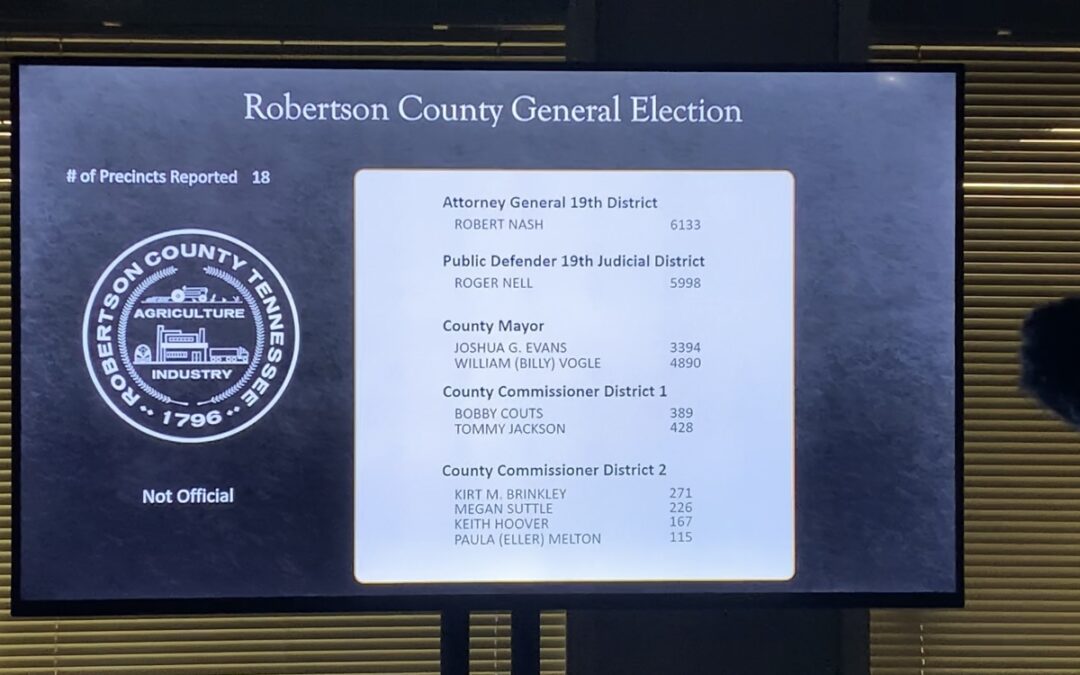
In this article, we discuss how Robertson County Government in Tennessee in the US used DataPoint to create their own election dashboard software for their election viewing party. A big thank you to Chet Biggers, IT Manager for Robertson Country for sharing this story...

PresentationPoint Delivers a Military Planning Tool to NATO

PresentationPoint Delivers a Military Planning Tool to NATO

Dec 14, 2020 | Articles, Case Studies, Data Dashboards, Government, Logistics, Military or Defense, Reporting

PresentationPoint is proud that our software is used in military planning for mission-critical situations needed by people who serve in military organizations. Our software is used by such militaries as the US Air Force and US Army. Recently we created a custom...
US Election Polls Data in PowerPoint

US Election Polls Data in PowerPoint

Oct 26, 2020 | Articles, DataPoint, Elections, Government, Maps

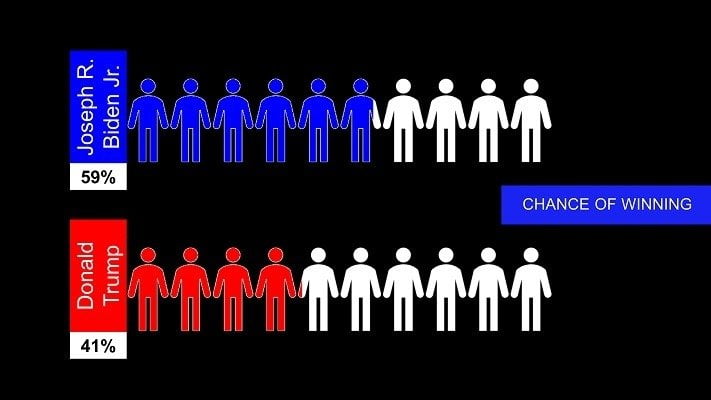
Elections are a great time for people who love data. In this video and article, we will show you some different ways to show US elections polls data in PowerPoint. Step 1: Assemble US Elections Poll Data The first step is to assemble the data. I found some US...

Voter Turnout Personalized Videos Created in PowerPoint

Voter Turnout Personalized Videos Created in PowerPoint

Oct 24, 2020 | Articles, Case Studies, DataPoint, Elections, Evergreen, Government, Non-profit

In this video, we show you how you can create personalized voter turnout videos using PowerPoint. The examples shown are for the US election, but will also work for any country, state, province, or municipal election. This could be used to increase voter turnout on a...

PowerPoint Road Signalization in Antwerp, Belgium

PowerPoint Road Signalization in Antwerp, Belgium

May 20, 2020 | Case Studies, DataPoint, DataPoint Real-time Screens, Government

We worked together with other companies to install a LED traffic information system driven and controlled by PowerPoint. When you search online for ‘PowerPoint traffic LED’, you get results with sample PowerPoint presentations with mostly a traffic light...
Smart City Project – Software Tools

Smart City Project – Software Tools

Apr 4, 2020 | Articles, Case Studies, Data Dashboards, DataPoint, Evergreen, Government, iPoint, Reporting

In this video and article, we are going to explore how our software can be used for your smart city project – to make your community or city truly data-driven. Smart City Project Concept What is a Smart City Project? This is a project meant to collect data from...
Reporting Software PowerPoint: SG Nordic Case Study

Reporting Software PowerPoint: SG Nordic Case Study

Oct 12, 2019 | Articles, Case Studies, Data Dashboards, DataPoint, DataPoint Automation, Evergreen, Financial, Government, Reporting

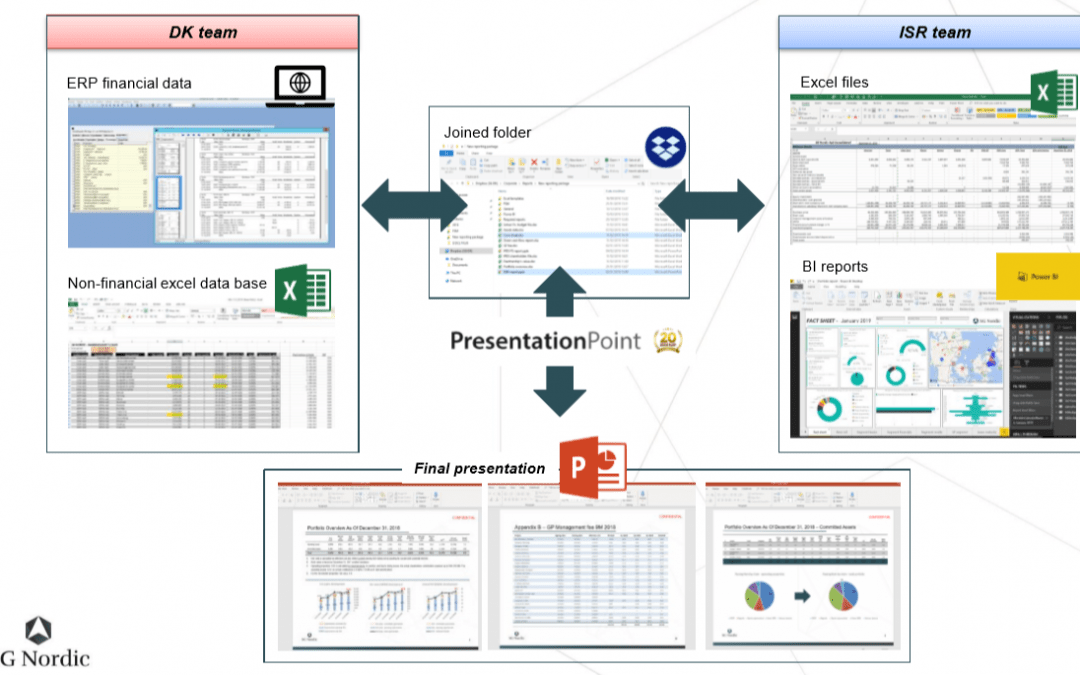
In this article and video, we are going to look at a real-life case study showing how PowerPoint can be used as reporting software. Thank you to Chen Buber, CFO of SG Nordic for taking the time to provide us with details of his process and how he is using DataPoint to...
Case Study: City of Winter Springs

Case Study: City of Winter Springs

Nov 10, 2018 | Attractions and Events, Case Studies, DataPoint, DataPoint Real-time Screens, Evergreen, Government, Interoffice Communication

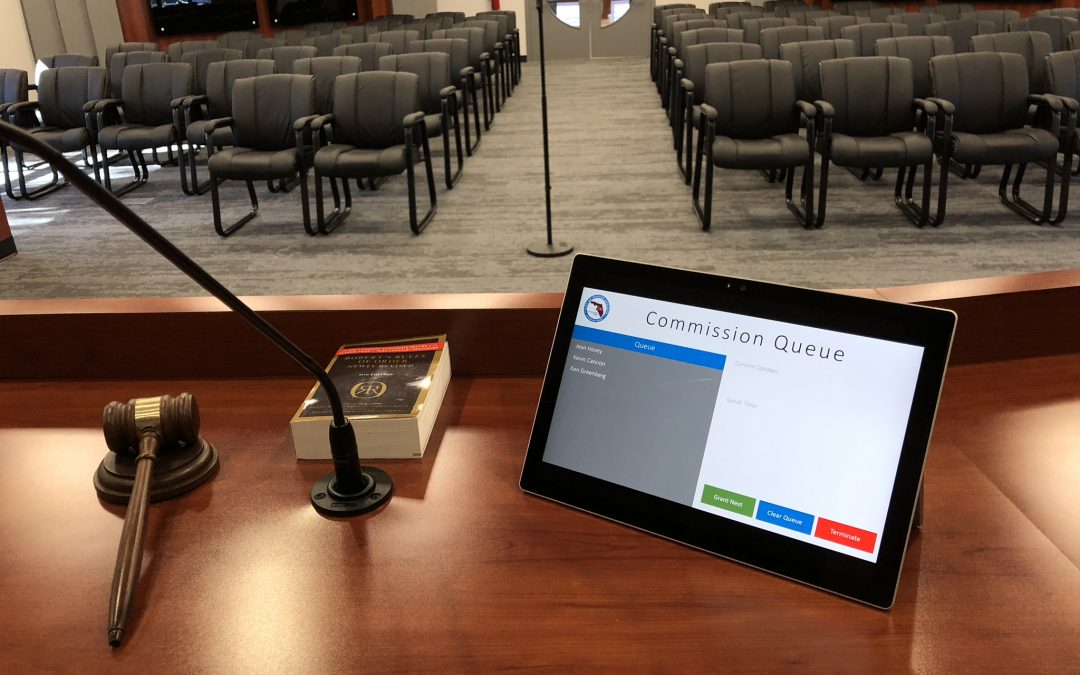
For our case study this time, we travel to the City of Winter Springs, Florida. Winter Springs is a city of 33,282 located in Seminole County Florida. The Problem The City of Winter Springs has bi-monthly Commission meetings between the public and their elected...

Case Study: As Belgium Town Hall

Case Study: As Belgium Town Hall

Mar 22, 2017 | Articles, Case Studies, DataPoint, Evergreen, Government, How-To

As is a small town of about 8,200 people in the province of Limburg in Belgium. As is also the home of PresentationPoint. The town hall of As helps clients every day. They used to have an “open” waiting room concept but this didn’t offer much privacy...
How to Display Live Election Results in PowerPoint

How to Display Live Election Results in PowerPoint

Oct 22, 2016 | Articles, DataPoint, DataPoint Real-time Screens, Elections, Government

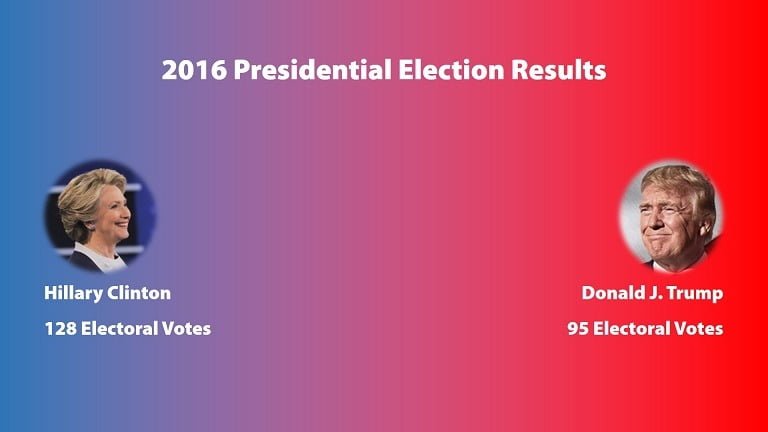
It’s election time and people are clamoring for the latest up-to-date polling or voting information. In this article, we’ll discuss how to display live election results in a PowerPoint presentation. How can this be used? This could be used by broadcasters...

Search

Categories

  • Articles
  • Attractions and Events
  • Aviation
  • Broadcasting
  • Case Studies
  • CounterPoint
  • Data Dashboards
  • DataPoint
  • DataPoint Automation
  • DataPoint Real-time Screens
  • Digital Signage
  • Dynamic elements
  • Education
  • Elections
  • Evergreen
  • FAQ
  • Financial
  • Food & Beverage
  • Government
  • Healthcare
  • Hotel
  • How-To
  • Human Resources
  • Industrial/Manufacturing
  • Interoffice Communication
  • iPoint
  • Logistics
  • Makeovers
  • Maps
  • Marketing and Advertising
  • Merge
  • MessagePoint
  • Military or Defense
  • Non-profit
  • QR Codes
  • Real Estate
  • Reporting
  • Retail
  • Scoreboards
  • Service reports
  • SignageTube
  • TickerPoint
  • Transportation
  • Tutorials
  • VideoPoint
  • Wayfinding
  • Weather

Recent Posts

  • Beyond Numbers: Telling Your Business Story with Compelling KPI Dashboards
  • Real-Time Scoreboards in PowerPoint: Boost Engagement with DataPoint Integration
  • Mastering Data Presentation: The Synergy of PowerPoint and DataPoint
  • Automated Data Reporting: Saving Time and Reducing Errors
  • How to Save Time Copying and Pasting Digital Information onto PowerPoint Presentations and Reports
  • Streamline Your Presentations: Creating Dynamic Dashboards with DataPoint in PowerPoint
  • From Hours to Minutes: DataPoint’s Game-Changing Approach to Automated Financial Reporting
  • Unlock Real-Time Insights: The Power of Live Dashboards for Your Business
  • Transform Your Presentations: Harness Live Data with DataPoint
  • From Slides to Documents: How DataPoint Transforms PowerPoint into a Document Maker
  • From Spreadsheets to Spectacle: Create Stunning Database Dashboards
  • Real-Time information for Police Air Support Team
  • The Future of Menus: How Surge Pricing Can Boost Your Restaurant’s Revenue
  • The Future of Documentation: Exploring Automated Document Makers
  • Data Storytelling: The Secret Weapon for Impactful Business Reports
  • Work Smart: Automatically Update PowerPoint Slide Notes with DataPoint
  • Why Smart Businesses Are Switching to Automated Reporting (And You Should Too)
  • Use DataPoint’s Real-Time Dashboards Capability to Unlock the Power of Live Data
  • Stop The Madness of Copy and Paste Data for PowerPoint Presentations and Reports
  • The Revolution of Business Communication: Embracing Digital Signage Over Traditional Paper Displays

Archives

  • December 2024
  • November 2024
  • October 2024
  • September 2024
  • August 2024
  • July 2024
  • June 2024
  • May 2024
  • April 2024
  • February 2024
  • January 2024
  • December 2023
  • November 2023
  • October 2023
  • September 2023
  • August 2023
  • July 2023
  • June 2023
  • May 2023
  • April 2023
  • March 2023
  • January 2023
  • November 2022
  • October 2022
  • September 2022
  • July 2022
  • June 2022
  • May 2022
  • April 2022
  • March 2022
  • February 2022
  • January 2022
  • December 2021
  • November 2021
  • October 2021
  • September 2021
  • August 2021
  • July 2021
  • June 2021
  • May 2021
  • April 2021
  • March 2021
  • February 2021
  • January 2021
  • December 2020
  • November 2020
  • October 2020
  • September 2020
  • August 2020
  • July 2020
  • June 2020
  • May 2020
  • April 2020
  • March 2020
  • February 2020
  • January 2020
  • December 2019
  • November 2019
  • October 2019
  • September 2019
  • August 2019
  • July 2019
  • June 2019
  • May 2019
  • April 2019
  • March 2019
  • February 2019
  • January 2019
  • December 2018
  • November 2018
  • October 2018
  • September 2018
  • August 2018
  • July 2018
  • June 2018
  • May 2018
  • April 2018
  • March 2018
  • February 2018
  • January 2018
  • December 2017
  • November 2017
  • October 2017
  • September 2017
  • August 2017
  • July 2017
  • June 2017
  • May 2017
  • April 2017
  • March 2017
  • February 2017
  • January 2017
  • December 2016
  • November 2016
  • October 2016
  • September 2016
  • August 2016
  • July 2016
  • June 2016
  • May 2016
  • April 2016
  • March 2016
  • February 2016
  • January 2016
  • December 2015
  • November 2015
  • October 2015
  • September 2015
  • August 2015
  • July 2015
  • June 2015
  • May 2015
  • April 2015
  • March 2015
  • February 2015
  • January 2015
  • December 2014
  • November 2014
  • October 2014
  • September 2014
  • May 2014
  • April 2014
  • March 2014
Celebrating 25 years of PresentationPoint

Subscribe To Our Newsletter

Join our mailing list to receive the latest news and updates from our team.

You can unsubscribe anytime. For more details, review our Privacy Policy.

Thank you!

You have successfully joined our subscriber list.

.

Recent Posts

  • Beyond Numbers: Telling Your Business Story with Compelling KPI Dashboards
  • Real-Time Scoreboards in PowerPoint: Boost Engagement with DataPoint Integration
  • Mastering Data Presentation: The Synergy of PowerPoint and DataPoint
  • Automated Data Reporting: Saving Time and Reducing Errors
  • How to Save Time Copying and Pasting Digital Information onto PowerPoint Presentations and Reports
  • Streamline Your Presentations: Creating Dynamic Dashboards with DataPoint in PowerPoint
  • From Hours to Minutes: DataPoint’s Game-Changing Approach to Automated Financial Reporting
  • Unlock Real-Time Insights: The Power of Live Dashboards for Your Business
  • Transform Your Presentations: Harness Live Data with DataPoint
  • From Slides to Documents: How DataPoint Transforms PowerPoint into a Document Maker

Follow Us

  • Facebook
  • YouTube
  • LinkedIn

Copyright Notice

BreakPoint, ConnectedCompany, CounterPoint, DataPoint, Dynamic ELEMENTS, iPoint, MessagePoint, NewsPoint, Numberish, OutlookPoint, PlanPoint, ShowPoint, SignageTube, Split-Flap TV, TickerPoint and VideoPoint are trademarks or registered trademarks of PresentationPoint. Microsoft and the Office logo are trademarks or registered trademarks of Microsoft Corporation in the United States and/or other countries.
  • Sitemap
  • Terms and Conditions
  • Privacy Policy
  • Facebook
  • Twitter
  • RSS
  • YouTube
  • LinkedIn

INSYNCR

We’ve Evolved Into Something Bigger

PresentationPoint has been acquired by INSYNCR, and we’re now powering next-generation solutions across multiple platforms. Your trusted partner has grown stronger, and we’re here to serve you better than ever.

INSYNCR

Automated reporting and data visualization solutions

SignageTube

Real-time digital signage solutions and display management

Split-Flap TV

Concept-specific digital signage solutions and display management

We are using cookies to give you the best experience on our website.

You can find out more about which cookies we are using or switch them off in .

PresentationPoint
Powered by  GDPR Cookie Compliance
Privacy Overview

This website uses cookies so that we can provide you with the best user experience possible. Cookie information is stored in your browser and performs functions such as recognising you when you return to our website and helping our team to understand which sections of the website you find most interesting and useful.

Strictly Necessary Cookies

Strictly Necessary Cookie should be enabled at all times so that we can save your preferences for cookie settings.